Amcrest Link for 960H DVRs3.3.25 - App Store

Please wait ... The app listing is being verified for availability.
You'll be able to see results in few seconds.


Publisher Description

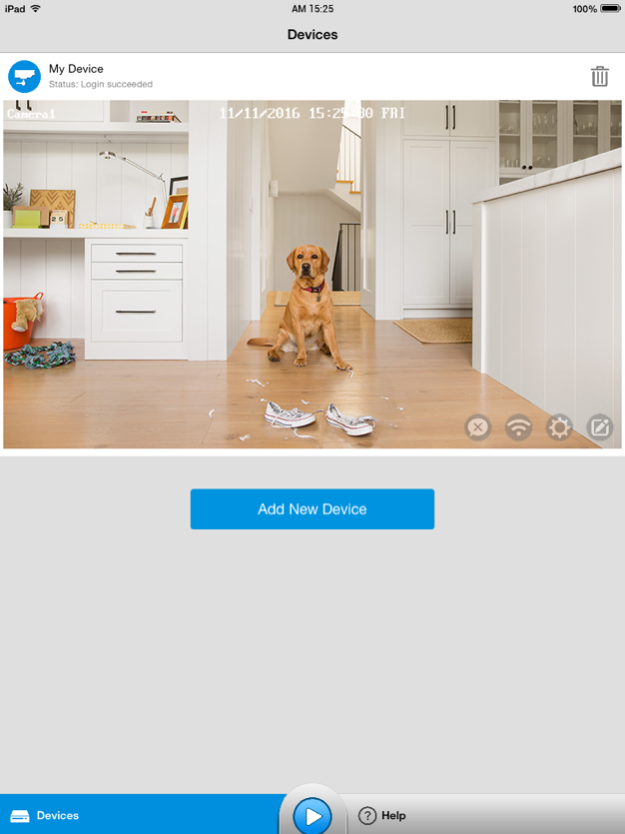
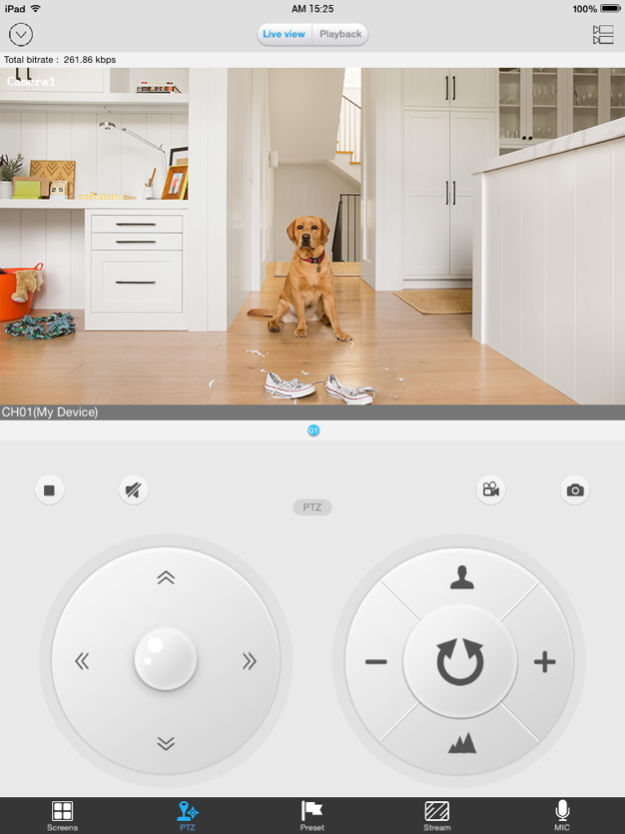
Amcrest Link supports the following features:
Multi-channel viewing with up to 4 cameras on screen at the same time Capture video from your camera live view to your iPhone to play back later Capture single and multi still images and save these to your
iPhone's Camera Roll Control PTZ (pan, tilt, zoom) cameras remotely Amcrest Link supports the DVR, NVR and IPCam models Note: This app uses a data stream that will connect to your DVR / NVR / IPCam via 3G/4G or WiFi. When using 3G/4G, the video from your DVR will likely be considered "downloads" by your phone service provider and will contribute to any download limit your phone data plan may have. If you exceed any plan limits you may incur additional usage charges. Consult with your mobile service provider regarding the use of a video streaming app and how it may affect your plan.

Version History Resolve the connection issue under ipv6 working environment. 3.3.25 04/18/2017 Fix the update notification bug. 3.3.24 03/29/2017 Amcrest Link for 960H DVRs 3.3.23.80 03/24/2017 Fix some bugs. 3.3.22 03/22/2017 - Added support for IPv6
- Fixed an issue where T-Mobile users could not connect over LTE 3.3.21 02/14/2017 New UI Design 3.2.16 11/18/2016 auto add device

fix some bugs 2.1.6 11/12/2015 new UI design

fix some bugs 2.1.5.18 08/13/2015 fix some bugs 2.0.5 12/16/2014 P2P Support 4G

fix some bugs 2.0.4 12/08/2014 2.0.3 10/24/2014


About Amcrest Link for 960H DVRs

Amcrest Link for 960H DVRs is a free app for iOS published in the Vertical Market Apps list of apps, part of Business.

The company that develops Amcrest Link for 960H DVRs is Amcrest Technologies LLC. The latest version released by its developer is 3.3.25.

To install Amcrest Link for 960H DVRs on your iOS device, just click the green Continue To App button above to start the installation process. The app is listed on our website since 2026-10-14 and was downloaded 0 times. We have already checked if the download link is safe, however for your own protection we recommend that you scan the downloaded app with your antivirus. Your antivirus may detect the Amcrest Link for 960H DVRs as malware if the download link is broken.

How to install Amcrest Link for 960H DVRs on your iOS device:

  • Click on the Continue To App button on our website. This will redirect you to the App Store.
  • Once the Amcrest Link for 960H DVRs is shown in the iTunes listing of your iOS device, you can start its download and installation. Tap on the GET button to the right of the app to start downloading it.
  • If you are not logged-in the iOS appstore app, you'll be prompted for your your Apple ID and/or password.
  • After Amcrest Link for 960H DVRs is downloaded, you'll see an INSTALL button to the right. Tap on it to start the actual installation of the iOS app.
  • Once installation is finished you can tap on the OPEN button to start it. Its icon will also be added to your device home screen.

Program Details


General

Publisher
Released Date
2026-10-14
Languages
English

Category

Category
Subcategory

System requirements

Operating systems
iOS

Download information

File size
20 bytes
Total downloads
0

Pricing

License model
Free
Price

Version History


Here you can find the changelog of Amcrest Link for 960H DVRs since it was posted on our website on 2016-10-29. The latest version is 3.3.25 and it was updated on Apps112 on 17 October, 2026. See below the changes in each version:

version 3.3.25

posted on 2026-10-14

Version History Resolve the connection issue under ipv6 working environment. 3.3.25 04/18/2017 Fix the update notification bug. 3.3.24 03/29/2017 Amcrest Link for 960H DVRs 3.3.23.80 03/24/2017 Fix some bugs. 3.3.22 03/22/2017 - Added support for IPv6
- Fixed an issue where T-Mobile users could not connect over LTE 3.3.21 02/14/2017 New UI Design 3.2.16 11/18/2016 auto add device

fix some bugs 2.1.6 11/12/2015 new UI design

fix some bugs 2.1.5.18 08/13/2015 fix some bugs 2.0.5 12/16/2014 P2P Support 4G

fix some bugs 2.0.4 12/08/2014 2.0.3 10/24/2014

version 3.3.25

posted on 2026-08-27

Version History This app has been updated by Apple to prepare for watchOS 27 compatibility. No new features are included.

Resolve the connection issue under ipv6 working environment. 3.3.25 04/18/2017 Fix the update notification bug. 3.3.24 03/29/2017 Amcrest Link for 960H DVRs 3.3.23.80 03/24/2017 Fix some bugs. 3.3.22 03/22/2017 - Added support for IPv6
- Fixed an issue where T-Mobile users could not connect over LTE 3.3.21 02/14/2017 New UI Design 3.2.16 11/18/2016 auto add device

fix some bugs 2.1.6 11/12/2015 new UI design

fix some bugs 2.1.5.18 08/13/2015 fix some bugs 2.0.5 12/16/2014 P2P Support 4G

fix some bugs 2.0.4 12/08/2014 2.0.3 10/24/2014

version 3.3.25

posted on 2026-08-07

Version History This update from Apple will improve the functionality of this app. No new features are included.

Resolve the connection issue under ipv6 working environment. 3.3.25 04/18/2017 Fix the update notification bug. 3.3.24 03/29/2017 Amcrest Link for 960H DVRs 3.3.23.80 03/24/2017 Fix some bugs. 3.3.22 03/22/2017 - Added support for IPv6
- Fixed an issue where T-Mobile users could not connect over LTE 3.3.21 02/14/2017 New UI Design 3.2.16 11/18/2016 auto add device

fix some bugs 2.1.6 11/12/2015 new UI design

fix some bugs 2.1.5.18 08/13/2015 fix some bugs 2.0.5 12/16/2014 P2P Support 4G

fix some bugs 2.0.4 12/08/2014 2.0.3 10/24/2014

version 3.3.25

posted on 2017-04-18

This app has been updated by Apple to display the Apple Watch app icon.

Resolve the connection issue under ipv6 working environment.

version 3.3.25

posted on 2017-04-18

Apr 18, 2017 Version 3.3.25
This app has been updated by Apple to use the latest Apple signing certificate.

Resolve the connection issue under ipv6 working environment.

version 3.3.25

posted on 2017-04-18

Apr 18, 2017 Version 3.3.25
Resolve the connection issue under ipv6 working environment.

version 3.3.25

posted on 2017-04-18

Apr 18, 2017 Version 3.3.25
This app has been updated by Apple to display the Apple Watch app icon.

Resolve the connection issue under ipv6 working environment.

version 2.1.6

posted on 2014-10-25

version 3.3.25

posted on 1970-01-01

18 de abr. de 2017 Version 3.3.25
Resolve the connection issue under ipv6 working environment.

version 3.3.25

posted on 1970-01-01

2017年4月18日 Version 3.3.25
Resolve the connection issue under ipv6 working environment.

Disclaimer


Official App Store Link


We do not host Amcrest Link for 960H DVRs on our servers. We did not scan it for viruses, adware, spyware or other type of malware. This app is hosted by Apple and passed their terms and conditions to be listed there. We recommend caution when installing it.

The App Store link for Amcrest Link for 960H DVRs is provided to you by apps112.com without any warranties, representations or guarantees of any kind, so access it at your own risk.

If you have questions regarding this particular app contact the publisher directly. For questions about the functionalities of apps112.com contact us.



Click stars to rate this APP!

Users Rating:
  0.0/5     0
Downloads: 0
Updated At: 2026-10-17
Operating System: iOS
License Type: Free

TOP DOWNLOADS
in Business last week